#1: “Set a weekly schedule”
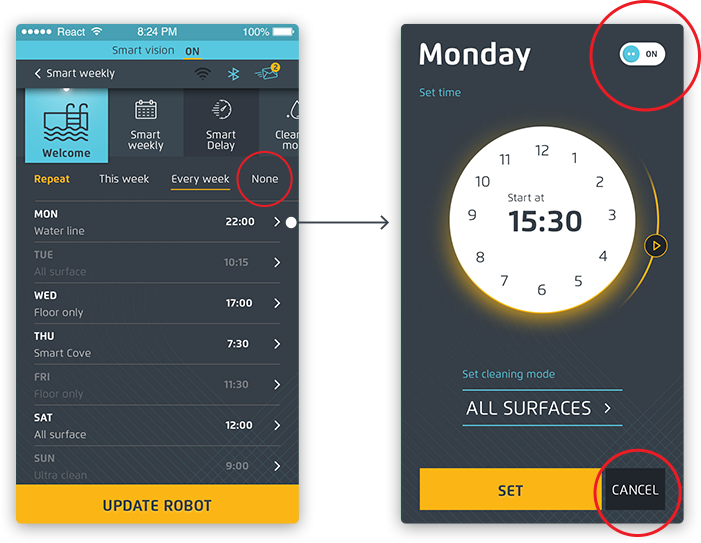
All the participants managed to identify the weekly schedule and 80% of them did it immediately within a few seconds.
"I understood that everything I need to do would be in the top menu so I had to look for it over there..."
Not everything in that screen was clear. When we asked participants to "disable all the possible scheduled events," only 20% managed to identify the 'None' button that we aimed for.
In the next task we asked the examinees to cancel the weekly event that was scheduled, and again we saw that they didn't act like we thought they would. Instead of turning off the toggle (on the top right side of the screen) they pressed the cancel button (on the bottom of the screen).
All the participants managed to identify the weekly schedule and 80% of them did it immediately within a few seconds.
"I understood that everything I need to do would be in the top menu so I had to look for it over there..."
Not everything in that screen was clear. When we asked participants to "disable all the possible scheduled events," only 20% managed to identify the 'None' button that we aimed for.
In the next task we asked the examinees to cancel the weekly event that was scheduled, and again we saw that they didn't act like we thought they would. Instead of turning off the toggle (on the top right side of the screen) they pressed the cancel button (on the bottom of the screen).
#2: “Set a specific area for the robot to
clean”
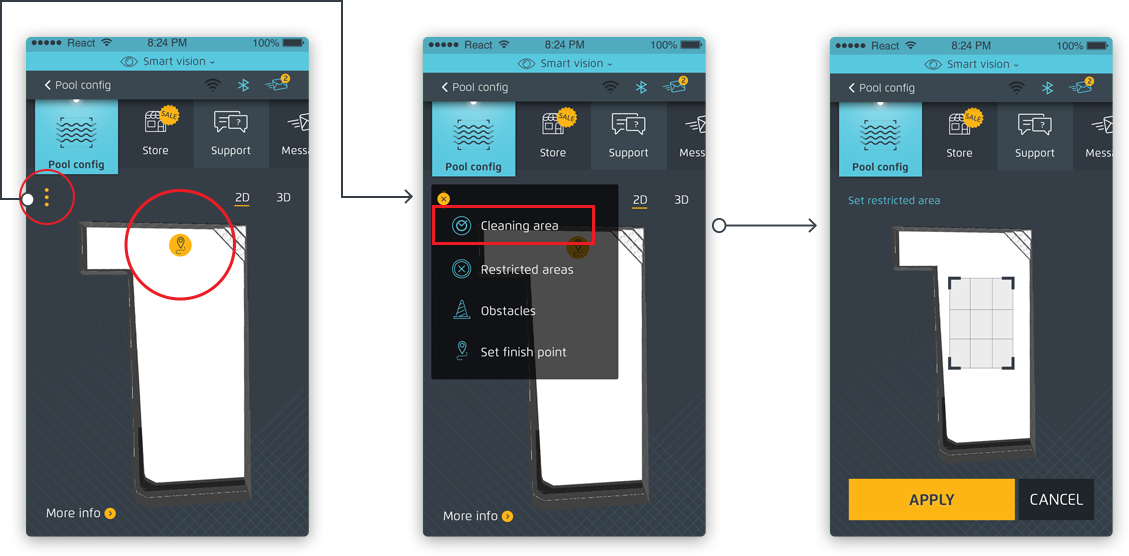
With this task we tried to understand if the user can figure out how to set a specific area on the pool simulation to clean. We noticed that the first thing that the participants tried to do is to drag the yellow dot on the pool simulation (symbolizing the end point of the robot after the last cleaning). When they realized that this was not the correct action, they pressed on the three dots (more options) button, where the cleaning area button was.
With this task we tried to understand if the user can figure out how to set a specific area on the pool simulation to clean. We noticed that the first thing that the participants tried to do is to drag the yellow dot on the pool simulation (symbolizing the end point of the robot after the last cleaning). When they realized that this was not the correct action, they pressed on the three dots (more options) button, where the cleaning area button was.

 Yotpo, Email & SMS multi-message
 App UX/UI. Prototyping. Usability Testing